Game guides
Paper Flight — Play a Paper Plane Browser Game
Paper Flight is a free paper airplane game you play in your browser with no download. Learn the launch angle, hold-to-climb and release-to-glide controls, and the five modes.
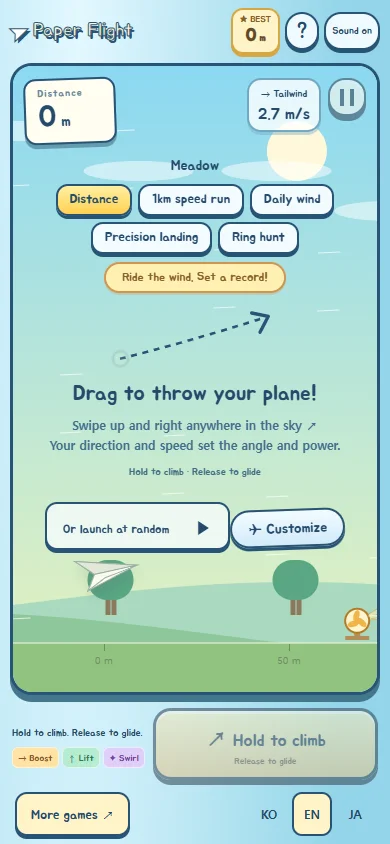
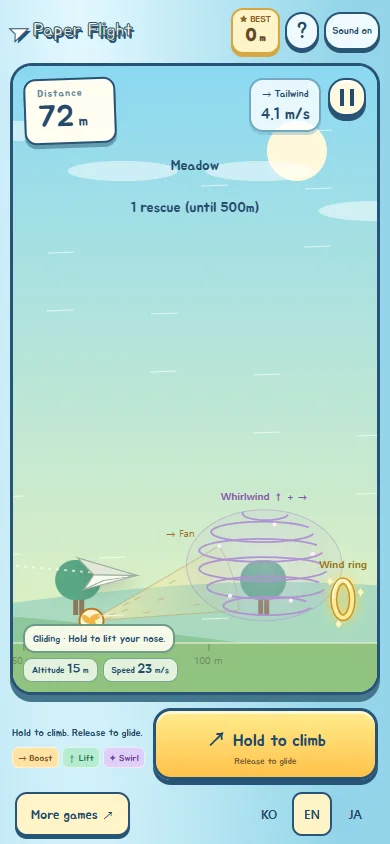
Launch and control
Paper Flight is a game about managing wind and flight attitude. Swipe up and right or use the launch button. Hold during flight to raise the nose and release to glide. On a keyboard, Enter launches and Space raises the nose.
Why release the control?
Holding the nose up can reduce speed. Watch speed and attitude as well as height. If prolonged climbing makes flight unstable, release and allow a gliding section. This game is not instruction for piloting real aircraft.
Change one thing in the same wind
Use Daily Wind or a record link with the same seed to compare course conditions. Record a manual launch, then change only the launch angle on the same course. In the next attempt, keep the angle and change how long you first hold the climb control. Changing several things at once makes the results harder to interpret.
Is there one best angle?
Wind and in-flight inputs both affect distance, so no launch angle is presented as universally optimal. Compare lower and higher launches for initial speed, height and final distance. Repeated attempts under the same conditions are more useful than one personal best.
Wind, pauses and records
Practice short holds and releases while observing wind effects. Use the pause button or P to stop temporarily. BEST shows personal records stored in this browser. Personal bests are separated by mode and rules version.
Five modes and retries
Distance Challenge measures distance until landing; 1km Speed Challenge measures average speed to the finish; Precision Landing rewards a smaller miss from the target; Ring Hunt scores rings for 60 seconds. Daily Wind uses the same course each day. Retry same course keeps the course, launch angle and power. For a new course, return to mode selection. Items apply separately. Start game chooses a random launch angle and power. Retry same course preserves the previous launch.
Frequently Asked Questions (FAQ)
Q. What is the optimal launch angle for Paper Flight?
A. Throw hard at 30–40° to fly faster for the first 900m. Too steep loses speed quickly; too low reaches the ground early. "Perfect launch!" appears when you nail it.
Q. What should I do when the wings shake?
A. Wing shaking indicates a stall. Immediately release the climb button to glide and recover airspeed.
Player Tips
Share your secret strategies or record-breaking tips with other players!