Game guides
Hexa Tap — Hexagonal Color Stacking Puzzle
Hexa Tap is a free hexagon color-sort puzzle game: stack ten chips of a color and they pop. Play in your browser with no download; rules and chain-combo tips explained.
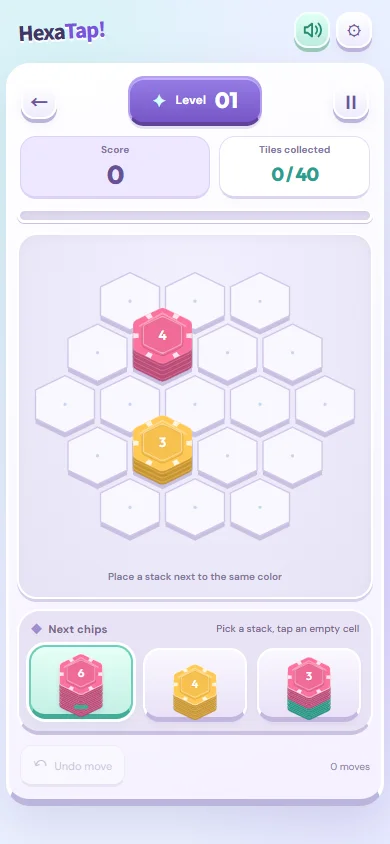
Place a stack on an empty cell
Choose a stack in the bottom tray and an empty hexagon. Occupied or frozen cells cannot accept a stack. Using all three tray stacks refills the tray.
Only matching top colors merge
Adjacent stacks with the same top color form a connected group. Their consecutive top chips of that color gather together, preferring the newly placed cell when it belongs to the group. Matching colors buried beneath another color do not merge immediately.
Clearing and chaining
A consecutive top run of ten or more matching chips clears. Six blue chips plus four matching neighboring chips can make ten. Exposing a new color does not guarantee another clear: it must form a suitable connection with the surrounding stacks.
Keep room for the next move
Before placing, count available empty cells, inspect remaining tray colors and consider the colors a clear will expose. Holding a stack at eight or nine is useful only when later colors and available space support the plan.
Stage targets and ice
Read the clear target and remaining moves on screen. In stages with ice, a clear on an adjacent cell damages it. A merge alone is different from clearing ten or more chips. When undo is available, compare an alternative placement with your previous move.
Resume, Daily Challenge and controls
Normal play resumes your saved stage. Daily Challenge uses a shared starting board and 40 placements, separately from normal play. On touch, select a tray block and tap an empty cell to preview, then tap the same cell again to place. Dragging places directly. Use 1/2/3 to choose a block, Tab to an empty cell and Enter to place it. Undo depends on the available free undo or owned item.
Frequently Asked Questions (FAQ)
Q. How do I trigger multi-step chain reactions in Hexa Tap?
A. Clearing ten or more matching top chips exposes the color below. A chain continues only if the exposed color connects with neighboring stacks. Consider the next tray colors and empty cells.
Player Tips
Share your secret strategies or record-breaking tips with other players!